Installing a new garage door keypad can make daily access to your garage much more convenient. However, it’s not uncommon to encounter issues right after setup. Whether the keypad isn’t responding, the door won’t open, or error lights are flashing, resolving these problems quickly is essential for both security and convenience. This guide provides step-by-step solutions for the most frequent problems users face with newly installed keypads, ensuring you can get your system working smoothly.
For those interested in learning about advanced features, you might find garage door keypad modern features explained helpful before diving into troubleshooting.
Common Issues After Setting Up a Garage Door Keypad
After installing a keypad, several typical issues may arise. Most are easy to fix with a bit of guidance. Here are the most frequent problems:
- Keypad not lighting up or responding
- Garage door does not open or close
- Keypad blinks but does not activate the opener
- Incorrect PIN or programming errors
- Intermittent operation or range issues
Initial Steps for Troubleshooting New Keypad Installations
Before diving into advanced troubleshooting, start with these basic checks. These steps resolve many problems related to garage door keypad troubleshooting after installation and can save time.
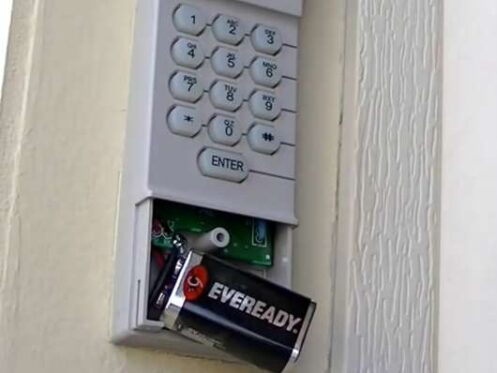
- Check the Battery: Most keypads use a 9V battery. If the keypad is unresponsive, replace the battery with a fresh one. Even new keypads can ship with partially depleted batteries.
- Inspect the Wiring: For wired models, ensure all connections are secure and undamaged. Loose wires can prevent the keypad from communicating with the opener.
- Review the User Manual: Each manufacturer may have unique programming steps. Double-check that you followed the correct procedure for your model.
- Test the Range: Stand directly in front of the keypad and try again. Sometimes, interference or distance can affect wireless models.
Programming and Reprogramming the Keypad
Programming errors are a common source of frustration. If your keypad isn’t working as expected, reprogramming it can often resolve the issue. Here’s how to approach this process:
- Locate the Learn Button: On most openers, the learn button is found on the back or side of the motor unit. Pressing it puts the opener into programming mode.
- Enter the PIN: Enter your desired PIN on the keypad, then press the appropriate button (often “Enter” or “Send”).
- Confirm Programming: The opener’s lights may blink or you’ll hear a click, indicating successful programming.
- Test Operation: Try the keypad several times to ensure the new code works consistently.
If you encounter persistent issues, reviewing garage door keypad firmware issues can provide insight into compatibility or software-related problems.
Battery and Power Issues in Newly Installed Keypads
Power problems are among the most frequent causes of keypad malfunctions. If your keypad is not lighting up or responds intermittently, focus on these steps:
- Replace the Battery: Remove the cover and swap in a new battery. Ensure it’s seated properly and the contacts are clean.
- Check for Corrosion: Inspect the battery terminals for any corrosion or debris. Clean gently with a dry cloth if needed.
- Test After Replacement: Once the battery is replaced, test the keypad. If it still fails, consider resetting the keypad and reprogramming it.
Keypad Blinking or Not Opening the Door
A blinking keypad usually indicates a communication or programming problem. Here’s how to address this:
- Re-enter the PIN: Make sure you’re using the correct code. If you’ve forgotten it, reset the keypad according to the manufacturer’s instructions.
- Reprogram the Keypad: Follow the programming steps again, ensuring you press the learn button and enter the code correctly.
- Check for Interference: Nearby electronic devices or metal objects can sometimes interfere with the wireless signal. Move such items away if possible.
- Inspect the Opener: Ensure the opener itself is powered and functioning. Try using a remote control to rule out opener issues.

Advanced Troubleshooting for Persistent Problems
If the basic steps haven’t resolved your issue, consider these more advanced troubleshooting strategies:
- Factory Reset: Some keypads allow a full reset to default settings. This can clear programming errors and allow you to start fresh.
- Check Compatibility: Not all keypads work with every opener. Refer to the manufacturer’s compatibility list or consult resources like different types of garage door openers to ensure your devices are matched.
- Firmware Updates: For smart or connected keypads, check if a firmware update is available. Outdated software can cause communication failures.
- Manual Override: If you need immediate access, review garage door keypad manual override options for your model.
- Consult Professional Help: If all else fails, contact a professional installer or the manufacturer’s support line.
Tips for Reliable Keypad Performance
Once your keypad is working, a few simple habits can help prevent future issues:
- Change the battery annually or when you notice decreased responsiveness.
- Keep the keypad clean and free from dirt, dust, and moisture.
- Reprogram the code periodically for added security.
- Check for firmware updates if your keypad supports them.
- Review integration options if you use smart home systems. Learn more about garage door keypad integration with smart garage for seamless operation.
Frequently Asked Questions
Why won’t my new garage door keypad respond after installation?
The most common reasons are dead batteries, incorrect programming, or poor connections. Start by replacing the battery, then reprogram the keypad following the manufacturer’s instructions. If the issue persists, check for compatibility with your garage door opener.
What should I do if my keypad blinks but the door won’t open?
A blinking keypad usually signals a programming error or communication problem. Try re-entering your PIN, reprogramming the keypad, and checking for interference from nearby electronics. Also, verify that the opener itself is working by using a handheld remote.
How do I reset my keypad if I forgot the code?
Most keypads can be reset by pressing and holding a specific button (often the “Learn” button) on the opener until the indicator light blinks. Then, follow the programming steps to set a new PIN. Refer to your user manual for model-specific instructions.
Can I use my keypad with a smart garage door opener?
Many modern keypads are compatible with smart openers, but it’s important to check compatibility. For more details, see garage door keypad and smart opener issues for integration tips and troubleshooting.