Understanding where to find the garage door keypad reset button location is essential for homeowners who want to maintain security and troubleshoot access issues. Whether you’re setting up a new code, resolving a malfunction, or simply updating your system, knowing how to locate and use the reset button can save time and prevent unnecessary service calls.
Many modern garage door systems include a wireless keypad for convenient entry. Over time, you may need to reset the keypad—perhaps after moving into a new home, forgetting your code, or experiencing technical glitches. This article will guide you through the common places to find the reset button, explain why it matters, and offer practical tips for different brands and models.
If you’re also dealing with sensor issues, you might find it helpful to read about why is my garage door sensor indicator light missing for additional troubleshooting advice.
Why the Reset Button Matters for Garage Door Keypads
The reset button on a garage door keypad is a critical feature for both security and convenience. It allows you to clear old codes, add new users, and restore factory settings if the keypad malfunctions. Without access to this button, you may be locked out or forced to call a technician for simple fixes.
Manufacturers design these buttons to be accessible but not obvious, helping prevent unauthorized resets. Knowing the typical reset button location for your keypad model can streamline maintenance and enhance your garage’s security.
Common Places to Find the Garage Door Keypad Reset Button
While keypad designs vary, most reset buttons are located in one of a few standard spots. Here’s where you’re most likely to find them:
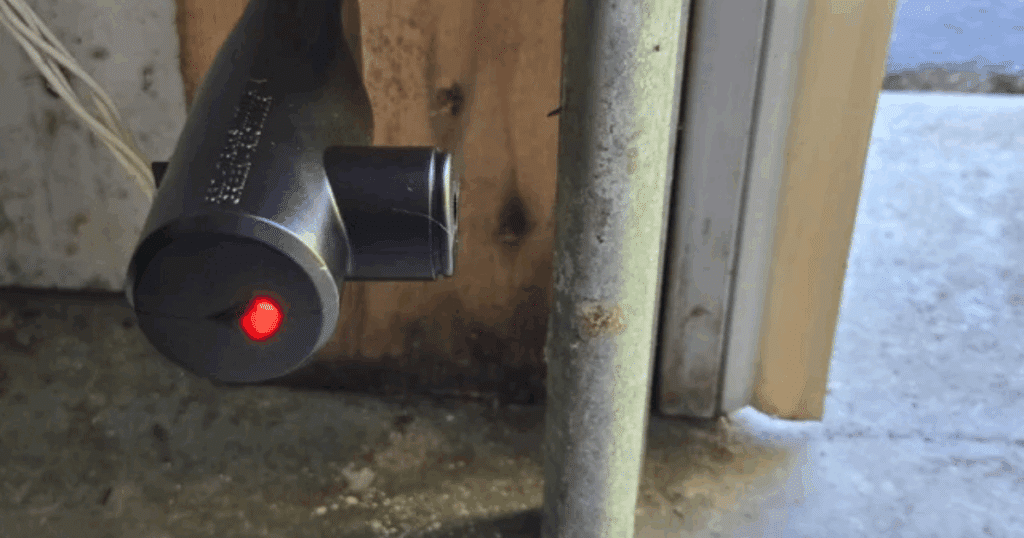
- On the Garage Door Opener Motor Unit: The most common place is on the main opener unit mounted to the ceiling of your garage. Look for a small button labeled “Learn,” “Program,” or “Reset.”
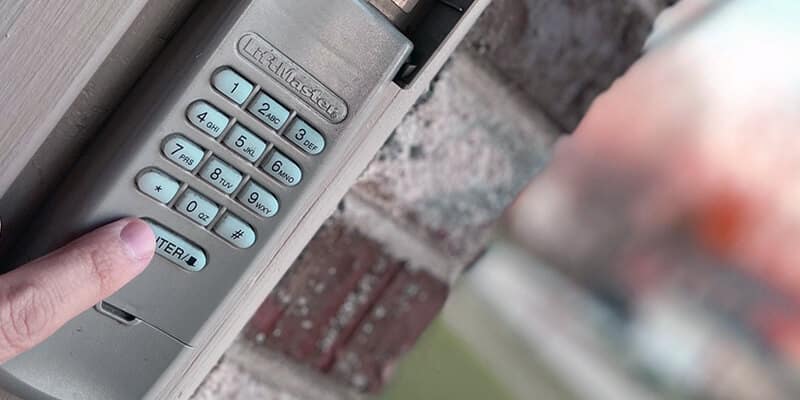
- Behind the Keypad Cover: Some keypads have a dedicated reset button inside the battery compartment or behind the keypad faceplate. You may need to slide or unscrew the cover to access it.
- Near the Antenna Wire: On certain models, the reset button is close to the antenna wire that hangs from the opener motor.
Always consult your owner’s manual for model-specific guidance, as the exact location can differ between brands and generations.
Brand-Specific Reset Button Locations
Different manufacturers use unique designs for their garage door keypads and openers. Here are some tips for the most common brands:
- LiftMaster, Chamberlain, and Craftsman: These brands typically place the reset or “Learn” button on the back or side of the main opener unit. It’s often a colored button (red, yellow, orange, or purple) near the wiring terminals and antenna.
- Genie: Genie openers usually have a “Learn Code” button on the motor head. For keypads, the reset function may be inside the battery compartment.
- Overhead Door: Look for the reset button on the main opener or inside the keypad’s battery area.
If you’re unsure, check the manufacturer’s website or user manual for diagrams and step-by-step instructions.
How to Reset Your Garage Door Keypad
Once you’ve found the reset button, follow these general steps to reset your keypad:
- Access the Reset Button: Open the motor unit cover or keypad battery compartment as needed.
- Press and Hold: Press and hold the button until the indicator light blinks or turns off (usually 5–10 seconds).
- Reprogram the Keypad: Enter your new code following the manufacturer’s instructions. This usually involves pressing the reset button again, then entering your chosen code on the keypad.
- Test the System: Close the cover and test the keypad to ensure the new code works.
Always follow your specific model’s instructions, as steps can vary.
Troubleshooting Common Issues After Resetting
If your keypad isn’t working after a reset, consider these troubleshooting tips:
- Check the Batteries: Weak or dead batteries are a frequent cause of keypad failure.
- Ensure Proper Programming: Carefully follow the programming steps for your model. Missing a step can prevent the new code from registering.
- Inspect for Interference: Nearby electronics or metal objects can interfere with the keypad’s signal.
- Look for Physical Damage: Exposure to weather or accidental impacts can damage the keypad or wiring.
If problems persist, consult your manual or contact a professional technician.
For those dealing with sensor-related problems, you may also want to review how to fix a garage door sensor that is misaligned by a fraction for further guidance.
Tips for Maintaining Your Garage Door Keypad
Regular maintenance can extend the life of your keypad and reduce the need for resets. Here are some best practices:
- Keep It Clean: Wipe the keypad with a dry cloth to remove dust and debris.
- Replace Batteries Annually: Fresh batteries ensure reliable operation.
- Protect from Weather: If your keypad is exposed, consider a weatherproof cover.
- Update Codes Regularly: Change your access code if you move, lose a remote, or suspect unauthorized access.
Staying proactive with maintenance helps prevent lockouts and keeps your garage secure.
When to Call a Professional
While most keypad resets are straightforward, some situations require expert help. If you can’t locate the reset button, the keypad won’t reprogram, or you suspect a wiring issue, it’s best to contact a qualified technician. Attempting complex repairs without proper knowledge can lead to further damage or safety risks.
For those considering an upgrade, you can explore options for the best garage door openers for 2025 to find models with advanced security and user-friendly features.
FAQ
Where is the reset button on my garage door keypad?
The reset button is most commonly found on the main opener unit in your garage, often labeled as “Learn,” “Program,” or “Reset.” Some keypads have the button inside the battery compartment or behind the faceplate. Refer to your owner’s manual for your specific model.
What should I do if I can’t find the reset button?
If you cannot locate the reset button, check the manual or the manufacturer’s website for diagrams. Sometimes, the button is hidden for security reasons. If you’re still unable to find it, consider contacting a professional for assistance.
Can I reset my garage door keypad without the reset button?
In most cases, the reset button is required to clear and reprogram codes. Some older models may allow code changes using a sequence of keypad presses, but newer systems typically need the button for security. Always follow your device’s instructions.
How often should I change my garage door keypad code?
It’s a good idea to update your code at least once a year, or immediately if you move, lose a remote, or suspect unauthorized access. Regular updates help maintain your home’s security.
Understanding the garage door keypad reset button location empowers you to manage your garage access confidently. With the right information and a little maintenance, you can keep your entry system secure and functional for years to come.