Smart garage door sensors and their companion apps have made it easier than ever to monitor and control your garage remotely. However, when these systems fail to sync or the app doesn’t communicate with your sensor, it can be frustrating and inconvenient. Understanding how to troubleshoot smart garage door sensor apps is essential for restoring seamless operation and ensuring your home’s security.
This guide walks you through practical steps for identifying and resolving common issues with smart garage door sensors and their mobile applications. Whether you’re dealing with connectivity problems, app errors, or sensor malfunctions, you’ll find actionable advice here. For more specific sensor mounting challenges, you might also want to review how to fix garage door sensor mounting on metal studs for additional insights.

Understanding Common Issues with Smart Garage Door Sensor Apps
Before diving into solutions, it’s helpful to recognize the most frequent problems users encounter with smart garage door sensor apps:
- Connectivity failures between the app and the sensor device
- App not detecting the sensor or reporting inaccurate status
- Syncing delays or repeated disconnections
- Sensor not responding to app commands
- Notifications not being sent or received
Identifying which of these issues you’re facing will help you target your troubleshooting efforts more effectively.
Initial Steps for Diagnosing Sensor and App Problems
When your smart garage door sensor app isn’t working as expected, start with these basic checks:
- Check Power and Batteries: Ensure the sensor is powered on and, if battery-operated, that the batteries are fresh.
- Verify Wi-Fi Connection: Both your mobile device and the sensor hub should be connected to a stable Wi-Fi network. Weak or intermittent Wi-Fi is a common cause of sync issues.
- Restart Devices: Power cycle your smartphone, the sensor hub, and your router. Sometimes a simple restart can resolve temporary glitches.
- Update Firmware and App: Make sure both your sensor’s firmware and the mobile app are up to date. Manufacturers often release updates to fix bugs and improve compatibility.
If these steps don’t resolve the problem, it’s time to dig deeper into specific troubleshooting techniques.
Advanced Troubleshooting for App and Sensor Sync Issues
If basic steps haven’t fixed the issue, try these more targeted solutions:
Re-Syncing the Sensor with the App
Most smart garage door systems have a pairing or sync mode. Consult your manufacturer’s instructions to put both the sensor and the app into pairing mode. Remove the device from the app and add it again if necessary. This often resolves persistent connection issues.
Resetting the Sensor
Performing a factory reset on the sensor can clear out software bugs or corrupted settings. Hold the reset button (usually found on the sensor or hub) for the recommended duration. After resetting, set up the device from scratch in the app.
Checking for Interference and Obstructions
Physical obstructions, metal objects, or other wireless devices can interfere with the sensor’s signal. Make sure the sensor’s line of sight is clear and that it’s not installed near sources of interference. For issues related to wiring or mounting, consider reviewing how to fix garage door sensor wiring using electrical tape or how to fix garage door sensor bracket alignment for step-by-step guidance.
App Permissions and Settings
Ensure the app has all necessary permissions enabled on your phone, including access to Wi-Fi, Bluetooth, and notifications. Sometimes, denied permissions can prevent the app from communicating with the sensor.
Testing Sensor Functionality Outside the App
To determine if the issue lies with the sensor itself or the app, test the sensor independently:
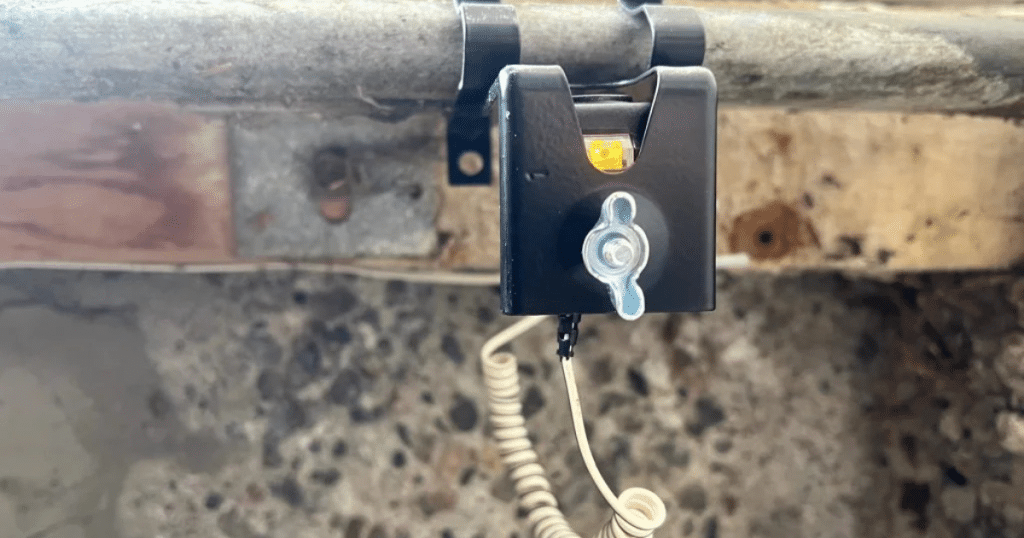
- Check the sensor’s indicator lights. Most sensors have LEDs that signal power, alignment, and error states.
- Manually operate the garage door to see if the sensor responds (e.g., stops or reverses the door when an object is detected).
- If the sensor fails these tests, the problem is likely hardware-related rather than app-based.
For a detailed guide on diagnosing faulty sensors, see this step-by-step process for testing garage door sensors.
When to Seek Professional Help
If you’ve tried all the above steps and your smart garage door system still isn’t working, it may be time to consult a professional. Persistent issues could indicate a defective sensor, wiring problems, or compatibility issues with your home network. If your transmitter is unresponsive, you may find answers in why is my garage door sensor transmitter dead.
Professional technicians can diagnose complex problems, replace faulty components, and ensure your system is set up securely and efficiently.
Best Practices for Maintaining Smart Garage Door Sensors and Apps
To minimize future issues, consider these maintenance tips:
- Regularly clean the sensor lenses to prevent dust or debris from blocking the signal.
- Check for firmware and app updates monthly.
- Test the system periodically to ensure reliable operation.
- Keep your Wi-Fi router firmware up to date and positioned to provide strong coverage in the garage area.
Proactive maintenance can help avoid many of the most common problems with smart garage door sensors and their companion apps.
FAQ
Why does my smart garage door app lose connection frequently?
Frequent disconnections are often caused by weak Wi-Fi signals, interference from other devices, or outdated firmware. Ensure your router is close enough to the garage and that your app and sensor firmware are current.
How can I tell if the problem is with the sensor or the app?
Test the sensor independently by checking its indicator lights and observing its response when the garage door operates. If the sensor works manually but not through the app, the issue is likely app-related. If the sensor doesn’t respond at all, it may be a hardware problem.
What should I do if my app says the garage door is open when it’s closed?
This can happen if the sensor is misaligned or obstructed. Check for dirt on the sensor, ensure it’s properly aligned, and verify that nothing is blocking its path. Re-syncing the sensor with the app can also help resolve status errors.
Can I use multiple apps to control the same garage door sensor?
Some sensors support multiple user accounts or apps, but others do not. Check your manufacturer’s documentation for compatibility. Using unsupported apps can cause sync issues or unreliable operation.
How often should I replace the batteries in my garage door sensor?
Battery life varies by model, but it’s a good idea to check and replace batteries at least once a year, or whenever you notice reduced range or delayed response from the sensor.