Flickering lights on your garage door sensors can be frustrating and may prevent your door from operating correctly. These blinking indicators are more than just an annoyance—they signal that something is wrong with the sensor system, which is a crucial safety feature. Addressing this issue promptly ensures your garage door remains safe and functional.
In this guide, you’ll learn practical steps for resolving sensor light problems, from simple cleaning to more advanced troubleshooting. We’ll also highlight common causes and provide links to related resources, such as how to rewire garage door sensors if needed.
Understanding Flickering Garage Door Sensor Lights
Garage door sensors are designed to prevent the door from closing if something is in its path. When the sensor lights start blinking, it’s a warning that the system is not working as intended. The most common reasons for this include misalignment, dirt or debris, wiring issues, or even direct sunlight interfering with the sensor beam.
Before diving into how to resolve these issues, it’s important to understand what the different light patterns mean. Typically, a steady light indicates proper alignment and function, while a blinking or flickering light suggests a problem that needs attention.
Common Causes of Sensor Light Flickering
Several factors can cause the indicator lights on your garage door sensors to blink. Here are the most frequent culprits:
- Misalignment: The sensors must face each other directly. Even a slight shift can break the beam and cause flickering.
- Dirt or Obstructions: Dust, spider webs, or objects blocking the sensor can interrupt the signal.
- Wiring Issues: Damaged or loose wires can disrupt the electrical connection.
- Sunlight Interference: Direct sunlight can sometimes confuse the sensor, causing it to blink.
- Faulty Sensors: Over time, sensors can wear out or become defective.
If you’re unsure about the wiring, you may want to review this resource on how to check garage door sensor wiring for damage.
Step-by-Step Solutions for Flickering Sensor Lights
Addressing blinking sensor lights doesn’t always require professional help. Many issues can be resolved with basic tools and a little patience. Follow these steps to restore your garage door’s safety system:
1. Inspect and Clean the Sensors
Begin by checking both sensors for dirt, cobwebs, or debris. Use a soft, dry cloth to gently wipe the lenses. Avoid using harsh chemicals, as these can damage the sensor surface.
2. Realign the Sensors
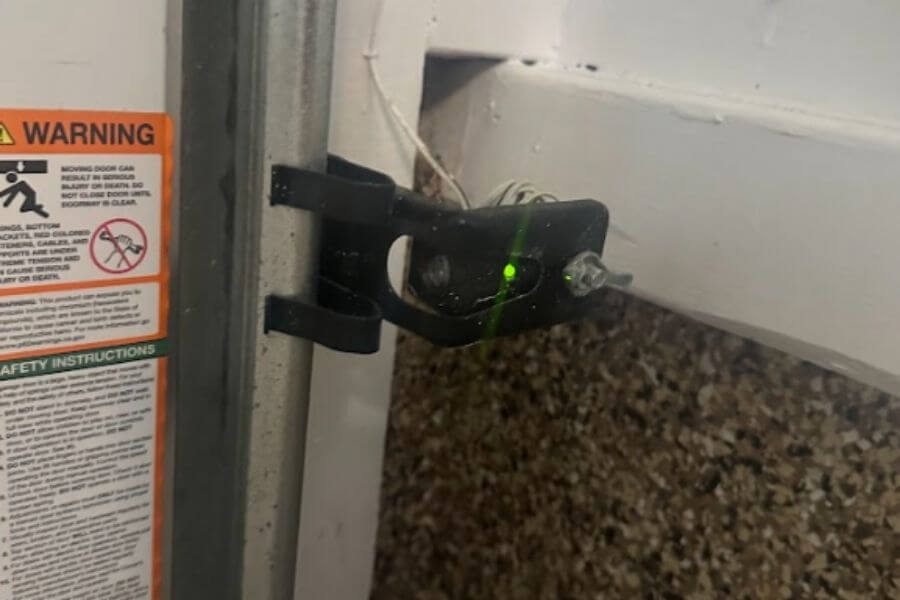
If cleaning doesn’t stop the flickering, check the alignment. Both sensors should point directly at each other. Loosen the mounting brackets slightly, adjust the sensors until the indicator lights become steady, then retighten the brackets. Even a small bump can knock them out of alignment.
3. Check for Obstructions and Sunlight
Remove any objects near the sensors that could block the beam. If your garage receives direct sunlight, try shading the sensors or adjusting their position to minimize interference.
4. Examine the Wiring
Inspect the wires connected to each sensor for signs of wear, fraying, or loose connections. If you notice any damage, turn off the power to the garage door opener before attempting repairs. For a detailed guide, see how to check garage door sensor wiring for damage.
5. Test the Safety System
After making adjustments, test the garage door by closing it with the remote. If the door closes smoothly and the sensor lights remain steady, the problem is likely resolved. For a more thorough check, refer to this guide to testing garage door safety sensors.
When to Replace or Rewire Your Sensors
If you’ve tried all the above steps and the lights continue to blink, your sensors may be faulty or the wiring may be compromised. In such cases, replacing the sensors or rewiring them might be necessary. You can find a step-by-step approach in this DIY guide to rewiring garage door sensors.
Additional Troubleshooting Tips
- Power Cycle: Unplug the garage door opener for 30 seconds, then plug it back in. This can reset the system and clear minor glitches.
- Check for Moisture: Water or condensation on the sensors can cause flickering. Wipe them dry and ensure the area is well-ventilated.
- Consult the Manual: Your garage door opener’s manual may provide model-specific troubleshooting steps.
- Seek Professional Help: If the issue persists after all troubleshooting, contact a qualified technician.
For more in-depth troubleshooting, you can visit this comprehensive guide to troubleshooting garage door sensors.
Preventing Future Sensor Issues
Regular maintenance can help you avoid sensor problems in the future. Here are a few tips:
- Clean the sensors monthly to prevent dust buildup.
- Check alignment after any impact or if the door is not closing properly.
- Inspect wiring annually for signs of wear or damage.
- Keep the area around the sensors clear of objects and debris.
- Test the safety system regularly to ensure everything is functioning.
If you ever encounter a situation where your garage door only closes when you hold the button, see this explanation of why your garage door only closes when holding the button.
FAQ
Why do my garage door sensor lights keep blinking even after cleaning?
If the lights continue to blink after cleaning, the sensors may be misaligned or there could be a wiring issue. Double-check alignment and inspect the wires for damage. Persistent blinking may indicate a faulty sensor that needs replacement.
Can sunlight cause garage door sensor lights to flicker?
Yes, direct sunlight can interfere with the sensor beam, causing the lights to blink. Try shading the sensors or repositioning them to minimize exposure to sunlight.
Is it safe to bypass garage door sensors if the lights are flickering?
Bypassing sensors is not recommended as it disables a key safety feature. If you need to bypass them temporarily, follow a safe and effective bypass guide, but plan to restore proper sensor function as soon as possible.