If you’ve noticed your garage door sensor light blinking twice, you’re not alone. This is a common issue that can prevent your garage door from operating properly. Understanding what causes this double-blink pattern and how to address it can save you time, money, and frustration. In this article, we’ll break down the most likely reasons for this signal, how to troubleshoot it, and what steps you can take to get your garage door working smoothly again.
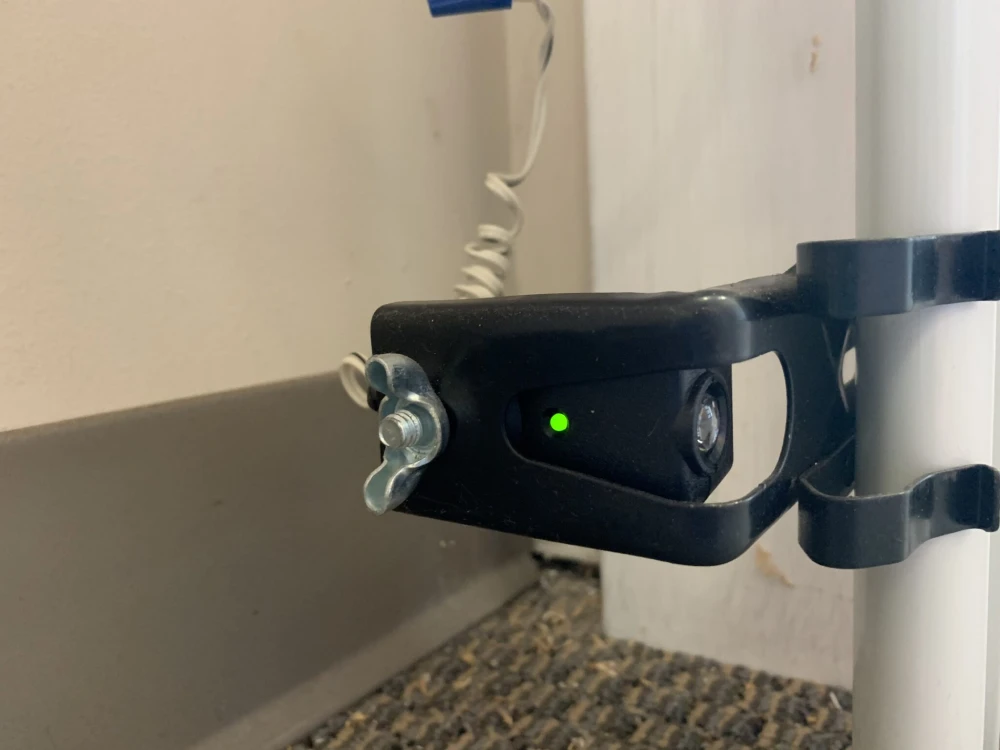
Before diving into solutions, it’s important to know that garage door sensors are critical safety features. They use an invisible beam to detect obstructions in the door’s path. When something interrupts this beam, the sensors signal the opener to stop or reverse the door. A blinking sensor light—especially one that flashes twice repeatedly—usually indicates a specific problem that needs attention.
For those interested in more technical troubleshooting, learning how to check garage door sensor voltage can help pinpoint electrical issues that might be causing sensor malfunctions.
Common Reasons for a Garage Door Sensor Light Flashing Twice
When the indicator on your garage door sensor flashes twice, it’s usually a coded message from the opener system. Manufacturers design these blink patterns to help homeowners and technicians diagnose problems quickly. Here are the most frequent causes:
- Misalignment of Sensors: If the sending and receiving sensors are not perfectly aligned, the beam can’t travel between them. This is the most common reason for a double-blinking sensor light.
- Obstruction in the Beam Path: Even a small object, spider web, or dust can block the infrared beam, causing the sensor to signal a problem.
- Wiring or Connection Issues: Loose, damaged, or corroded wires can disrupt the signal, resulting in the blinking pattern.
- Dirty Sensor Lenses: Dirt or moisture on the sensor lens can interfere with the beam, leading to false error signals.
- Sunlight Interference: Direct sunlight hitting the sensor can sometimes cause it to misread the beam, triggering the double-blink warning.
Troubleshooting Steps for Double-Blinking Garage Door Sensors
Addressing a sensor that blinks twice involves a systematic approach. Here’s how to resolve the most common issues:
- Check Sensor Alignment: Both sensors should face each other directly, with their lenses at the same height. Adjust them gently until the lights on both sensors are steady (not blinking).
- Remove Any Obstructions: Inspect the area between the sensors for objects, debris, or cobwebs. Clear anything that could block the beam.
- Clean the Sensor Lenses: Use a soft, dry cloth to wipe the lenses. Avoid using water or harsh chemicals, as moisture can cause further issues.
- Inspect Wiring and Connections: Look for loose or frayed wires at the sensors and the opener. Secure any loose connections and replace damaged wires if necessary.
- Shield Sensors from Sunlight: If sunlight is interfering, consider installing sun shields. For a step-by-step guide, see how to install garage door sensor sun shields.
- Reset the Sensors: Sometimes, a simple reset can resolve the issue. For detailed instructions, refer to this guide on resetting garage door sensors.
Understanding Sensor Light Codes and What They Mean
Each garage door opener brand may use slightly different blink codes, but a double-blink is widely recognized as a sign of sensor misalignment or obstruction. Here’s a quick reference:
| Number of Blinks | Likely Cause | Recommended Action |
|---|---|---|
| 2 | Misalignment or Obstruction | Realign sensors, clear beam path |
| 4 | Wiring Issue | Check connections and wires |
| 5+ | Sensor Failure | Replace sensor unit |
If your sensor light continues to blink twice after following the above steps, it may be time to consider replacing the sensors or consulting a professional technician.
Preventing Future Garage Door Sensor Issues
Regular maintenance can help you avoid recurring problems with your garage door safety system. Here are some practical tips:
- Keep Sensors Clean: Wipe the lenses monthly to prevent dust and dirt buildup.
- Check Alignment Regularly: Vibrations from the door or accidental bumps can knock sensors out of alignment.
- Protect from Moisture: If you live in a humid climate, moisture can cause sensor issues. Learn how to address this with tips for fixing garage door sensor moisture problems.
- Monitor for Sunlight Interference: Install shields or reposition sensors if direct sunlight is a recurring problem.
- Inspect Wiring Annually: Look for signs of wear or corrosion and address issues promptly.
Staying proactive with these steps will help ensure your garage door operates safely and reliably.
Related Sensor Light Patterns and What They Indicate
While a double-blink is the most common error pattern, other sensor light behaviors can point to different issues. For example, a steady yellow light may indicate a different problem. If you notice a yellow indicator, see this resource on why your garage door sensor is yellow and how to resolve it.
Understanding the meaning behind various sensor light codes can help you diagnose and fix issues more efficiently, keeping your garage door system in top shape.
Frequently Asked Questions
What should I do if realigning the sensors doesn’t stop the blinking?
If adjusting the sensors doesn’t resolve the issue, check for wiring problems, clean the lenses, and ensure there are no obstructions. If the problem persists, the sensor itself may be faulty and require replacement.
Can sunlight really cause my garage door sensor to malfunction?
Yes, direct sunlight can interfere with the infrared beam, causing false error signals. Installing sun shields or repositioning the sensors can help prevent this.
Is it safe to bypass the sensors if I’m in a hurry?
Bypassing garage door sensors is not recommended, as it disables a critical safety feature. Always address the underlying issue rather than attempting to override the sensors.
How can I tell if my sensor is completely broken?
If the sensor light doesn’t turn on at all, or if it blinks in an unusual pattern even after troubleshooting, the sensor may be defective. In this case, replacement is usually necessary.